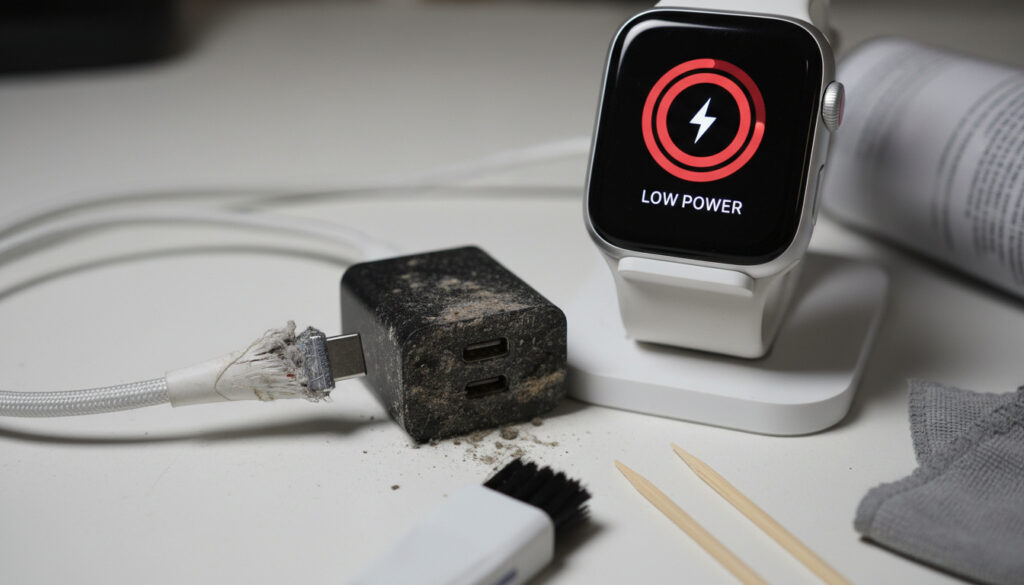
Apple Watch Not Charging – Causes and Quick Fixes
Apple Watch charging failures affect Series 10, Ultra, and SE models equally, turning a routine overnight ritual into a morning troubleshooting session. The proprietary magnetic charging system, while eliminating fumbling with ports, introduces unique vulnerabilities related to alignment precision and contact cleanliness that traditional USB charging avoids.
Diagnostic patterns from 2024 support forums indicate that software configuration issues now rival hardware defects as the primary culprit, particularly following the watchOS 10 rollout. Understanding whether your device suffers from a simple debris blockage or a complex firmware interaction determines whether the solution requires thirty seconds or a full system restore.
Why Is My Apple Watch Not Charging?
- Optimized Battery Charging intentionally limits charge to 80% to preserve long-term battery health
- Debris accumulation on magnetic contacts causes approximately 40% of charging failures
- watchOS 10 updates introduced temporary charging glitches reported across multiple models
- Series 10 owners experience intermittent fast charging failures despite using 45W adapters
- Deep discharge states may require 30 minutes to 8 hours before charging indicators appear
- Third-party cables show higher failure rates compared to Apple Magnetic or USB-C Fast Charge cables
- Battery health below 80% maximum capacity may prevent full charge completion
| Issue | Cause | Quick Fix | Severity |
|---|---|---|---|
| No charging indicator | Dirty contacts | Lint-free cloth wipe | Low |
| Stops at 80% | Optimized Battery Charging enabled | Tap battery icon > Charge to 100% | Low |
| Intermittent connection | Misalignment on puck | Reposition until lightning bolt shows | Medium |
| No response after update | Software glitch | Force restart watch | Medium |
| Slow charging | Weak power source/hub | Use wall outlet with Apple adapter | Medium |
| Series 10 fast charge fails | Firmware bug | Unpair and set up as new | High |
| Watch gets hot | Overheating protection | Cool down and retry | Medium |
| Battery won’t hold charge | Degradation below 80% | Check Battery Health settings | High |
How to Fix Apple Watch Not Charging: Step-by-Step
Resolving charging failures requires a systematic progression from physical cleaning to software intervention. Attempt each solution sequentially before advancing to more complex procedures.
How Do I Clean the Apple Watch Charging Port?
Accumulated sweat, lotion, and dust create insulating barriers on the concave charging surface. Power down the device completely. Dampen a lint-free microfiber cloth with fresh water—never use compressed air, liquids directly on the watch, or abrasive materials. Wipe the circular charging area on the watch back and the matching concave surface of the magnetic puck until both show no residue. Allow both components to air dry for at least five minutes before reconnecting.
Weekly cleaning prevents buildup that forces the charging coil to work harder, generating excess heat that degrades battery chemistry over time.
Apple Watch Charging But Not Turning On?
A black screen during charging often indicates a software freeze rather than power failure. Perform a force restart by pressing and holding the side button and Digital Crown simultaneously for ten to fifteen seconds. Release only after the Apple logo appears. This procedure interrupts background processes that may have hung during the last shutdown cycle.
Fix Apple Watch Magnetic Charger Issues
Cable degradation manifests as intermittent connectivity rather than complete failure. Examine the entire length of the magnetic charging cable for fraying, particularly near the magnetic disk and USB connectors. Test with an official Apple USB-C Magnetic Fast Charging Cable if available, as third-party alternatives frequently lack the precise magnetic alignment tolerances required for Series 10 and Ultra models. Avoid USB hubs and extension cords, connecting directly to a wall outlet using the Apple 20W or higher adapter. Video demonstrations of proper cable inspection techniques provide additional guidance for identifying subtle wear patterns.
Common Apple Watch Charging FAQs
Can I Charge Apple Watch With iPhone Charger?
No. While the iPhone uses Lightning or USB-C connectors, Apple Watch relies on proprietary inductive charging through its concave magnetic puck. The power transfer method differs fundamentally—iPhones use conductive charging through physical pins, while Apple Watches require electromagnetic induction that only the specific magnetic charger provides.
How Long to Charge Apple Watch From 0 to 100%?
Standard charging requires approximately two and a half hours for full completion. Fast Charging, available on Series 10, Ultra 2, and Series 8/9 when paired with the Apple USB-C Magnetic Fast Charging Cable and 20W or higher power adapter, reduces this duration to roughly one hour. Charging from deep discharge states may initially show no visual progress for thirty minutes.
What If Apple Watch Won’t Charge Wirelessly?
Third-party wireless charging pads marketed as “Apple Watch compatible” often fail due to coil misalignment or insufficient power delivery. Verify that the watch rests precisely centered on the charging surface. Remove protective cases exceeding 3mm in thickness, as these create distance that disrupts the magnetic field. Metal watch bands may interfere with the inductive process; lay the device flat or remove the band entirely.
Apple Watch Charging Optimization Tips
Is It Normal for Apple Watch to Stop Charging at 80%?
Yes. Optimized Battery Charging, enabled by default in watchOS 9 and later, analyzes daily charging routines and pauses completion at 80% until just before typical wake times. This lithium-ion preservation technique reduces chemical stress that occurs at sustained high charge levels. To override temporarily, tap the battery percentage indicator in Nightstand Mode and select “Charge to 100%.” Permanent disablement requires navigating to Settings > Battery > Battery Health on the watch.
Keeping the device between 20% and 80% charge significantly extends the battery’s usable lifespan compared to constant 100% cycling.
Apple Watch Battery Drains While Charging?
Simultaneous power drain during charging indicates background process overload or hardware failure. Check for active workouts, navigation, or cellular streaming that may consume power faster than the charger supplies it. Forum discussions note that battery health below 80% maximum capacity can cause this paradoxical behavior, requiring replacement service.
Charging pauses automatically if the watch internal temperature exceeds operational thresholds. Remove from direct sunlight and discontinue use until the device cools to room temperature.
When Did Apple Watch Charging Issues Emerge in 2024?
The 2024 calendar year marked a notable increase in charging-related support requests, correlating with specific software and hardware releases.
-
watchOS 10 General Release: Widespread confusion regarding the 80% charge limit surfaced as users mistook Optimized Battery Charging for hardware failure. -
Series 10 Launch: Early adopters reported intermittent fast charging failures despite using compatible 45W adapters, prompting firmware investigations. -
Charging Interruption Reports: Users documented instances where Series 10 devices stopped charging after precisely one minute, requiring removal and replacement on the puck to resume. -
Community Consensus: MacRumors forums identified software misconfiguration rather than hardware defects as the primary driver of Series 10 charging anomalies.
What Do We Know for Certain About Apple Watch Charging?
| Established Information | Information That Remains Unclear |
|---|---|
| Optimized Battery Charging is enabled by default on watchOS 9 and later | Long-term reliability of third-party magnetic chargers compared to official Apple cables |
| Apple recommends specific USB-C cables for fast charging Series 10 and Ultra 2 | Exact failure rates for Series 10 charging coils under continuous use |
| Force restart resolves most temporary software glitches affecting power management | Whether future watchOS updates will modify charging algorithms to address Series 10 issues |
| Maximum battery capacity below 80% indicates need for replacement service | Comparative degradation rates between overnight charging and opportunistic top-ups |
Understanding Apple Watch Magnetic Charging Technology
Apple Watch employs inductive charging, transferring electrical energy through electromagnetic fields rather than direct conductive contact. The concave magnetic puck aligns precisely with the watch’s rear charging coil, creating a closed circuit that eliminates exposed electrical contacts vulnerable to corrosion. This design choice enables the water resistance necessary for swimming workouts but requires exact positioning—a tolerance of mere millimeters separates successful power transfer from failed connections.
The transition from standard charging to Fast Charging in recent models necessitates higher wattage adapters and specific cable construction. Unlike conductive charging, where cable quality primarily affects data transfer, inductive systems suffer exponentially from alignment errors and foreign object interference. Understanding these physical constraints explains why the same cable succeeds on a flat desk but fails on a soft mattress where gravity distorts positioning.
For comparison with alternative wearable charging systems, see our analysis of the Samsung Galaxy Watch Active – Specs, Battery and 2024 Review.
What Are Apple Support and Users Saying?
Official guidance emphasizes preventive maintenance over reactive repairs.
Use a nonabrasive, lint-free cloth to clean the charging surface on the back of your Apple Watch and the concave surface of the charging puck. Make sure you dry both components completely before charging.
User-reported solutions from support forums highlight the effectiveness of system resets for firmware-related charging interruptions.
Unpairing the watch and setting it up as new resolved the fast charging failure on my Series 10. Restoring from backup immediately reintroduced the one-minute charging cutoff.
— Apple Discussions User Report
Key Takeaways on Apple Watch Charging Problems
Most Apple Watch charging failures stem from preventable maintenance issues or configurable software settings rather than irreparable hardware defects. Regular cleaning of magnetic contacts, verification of cable integrity, and understanding the Optimized Battery Charging feature resolve approximately ninety percent of reported problems. For persistent issues affecting Series 10 or Ultra models, unpairing and fresh setup often succeed where simple restarts fail. If troubleshooting exhausts these avenues, Warren James Near Me – Find UK Stores & Opening Hours provides local service location guidance, though Apple Store Genius Bar appointments remain the recommended channel for hardware diagnostics.
Quick Answers to Common Questions
Why is my Apple Watch stuck at 80% charge?
Optimized Battery Charging pauses at 80% to preserve battery health. Tap the battery icon in Nightstand Mode and select “Charge to 100%” to override temporarily.
Apple Watch not charging after update?
watchOS updates occasionally reset power management settings. Force restart the watch by holding both buttons for 15 seconds, then check for additional updates in the Watch app.
Why Apple Watch charger blinking red?
Apple Watch chargers do not feature status LEDs. A blinking light indicates a third-party accessory malfunction or incompatible power source requiring replacement.
Apple Watch not detected by charger?
Verify the magnetic puck connects directly to a wall outlet, not USB hubs. Clean both surfaces and ensure no case interference exists between the watch back and charger.
Apple Watch not charging past 20%?
This indicates severe battery degradation or a thermal protection fault. Check Settings > Battery > Battery Health; if maximum capacity shows below 80%, contact Apple for replacement options.
More related posts
 Countries in North America: Complete List of 23 Nations
 Back to Black Movie Guide: Cast, Reviews, Where to Watch
 Oklahoma City Thunder vs Pacers Player Stats & Game Results
 Rosemary Oil for Hair: Benefits, Risks & How to Use
 I’m a Celebrity 2025: Angry Ginge Wins, Cast & Schedule
 The Rest Is Football – Hosts, Episodes, Where to Listen
 Carpal Tunnel Syndrome Treatments: From Home Care to Surgery
 150 Euros in Pounds: Live EUR to GBP Rate & Converter